
Sharing WiFi with a QR code, and fixing one that won't connect
Scan, tap, connected. When it works it's the easiest way to share WiFi; when it doesn't, the cause is almost always one of a handful. Here's how it works and how to fix it, and Conéctame, an Android app, makes a printable card that gets it right.
Make my WiFi card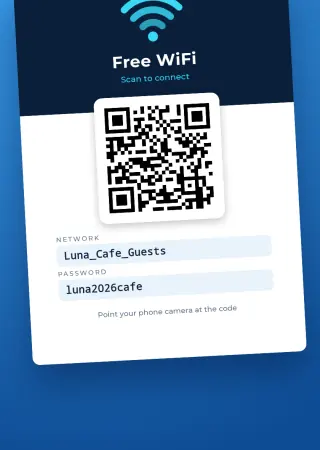
What's inside a WiFi QR code
It isn't a link to a website. It's a short text with the network name, the security type and the password, in a format phone cameras understand. Scanning it offers to join the network with nothing to type. That's why it works without internet, and why it stops working the moment you change the password.
How to scan one
- iPhone. Open the Camera, point it at the code and tap the banner to join the network.
- Android. On most recent phones the camera does the same. On some, the reader lives in Google Lens or in the WiFi settings.
- Laptops and Macs. They usually can't scan it. For them, have the password written on the card as well.
Why it won't connect
| What happens | Most likely cause |
|---|---|
| It says the password is wrong | A character or capital letter is off. Copy the password exactly from the router or your provider's app. |
| It can't find the network | The name doesn't match exactly, or the network is hidden and that wasn't set when the code was made. |
| It worked, then stopped | The router password changed. You need a new code. |
| The camera doesn't react | Print too small, glossy, or with no white margin. Some older phones need a reader app. |
| Some phones connect, others don't | Could be the security type: the app offers WPA/WPA2, WEP or open network. If your network is WPA3 only, test it before printing. |
A code that stays on the wall
For a shop, a rental or a house with lots of visitors, a printed code beats showing your phone every time. With Conéctame you type the network name and password, pick the security and the app makes a card with the QR code, ready to print or share. You choose whether the password also appears written on the card.
No account and nothing uploaded: the card is made on your phone.
Common questions
Do you need internet to connect with the code?
No. The code holds the network details, and the phone reads them offline.
Is it safe to put the WiFi QR code on display?
Anyone who scans it gets your password, just as if they read it on a chalkboard. For customers, use a guest network kept apart from your till or office computer.
Does it work with a hidden network?
Yes. Mark the network as hidden in the app and the code includes it.
Can I make a WiFi QR code without a password?
Yes, for an open network: choose no password as the security type.