
WiFi, without spelling the password
"Capital T, then 3, lowercase g, underscore, no, wait..."
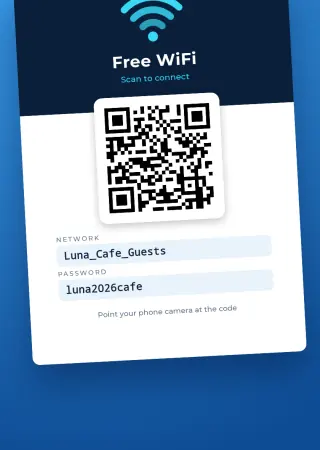
Turn your network and password into a card with a QR code. Guests point their camera at it and they're online, with nothing to type.
Make my WiFi cardAndroid app. No account and no uploads: your password never leaves your phone.
What anyone would ask
- What do I need?
- Your network name (SSID), the password and the security type: WPA/WPA2, WEP or open. Hidden networks work too.
- What does the card look like?
- Night blue, with the WiFi sign, the QR code, and the network and password typed in clear boxes for the odd phone that can't scan.
- Does the password have to be printed?
- No, you decide. Take it off and it only lives inside the code.
- How do I hand it out?
- Print it, or send it by message or email. One per table, one at reception, as many as you need.
Useful wherever people wait
- Hair salons
- Clinics
- Hotels and rentals
- Cafés and bars
- Meeting rooms
- Gyms
- Repair shops
- Stores
- Classrooms
- Your own fridge door
Three details and you're done
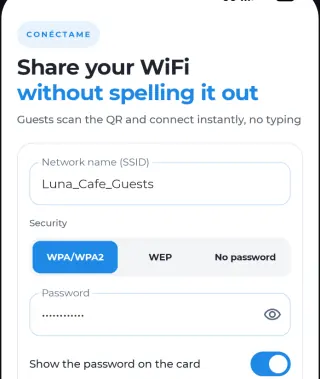
- Enter the network name and password and pick the security type.
- Choose whether to show the password on the card.
- Download it to print, or share it.
Cards carry a small Pasarela48 footer. PRO removes it and the ads, and lets you write your own line at the bottom.
Before it goes on the wall
Anyone who sees the card has your password, so it shouldn't be the network your till or office computers use. Set up a guest network if your router has one, and use that for the card.
Common questions
Do guests need to install anything?
No. Most current phone cameras recognize these codes. For any that don't, the card can show the network and password in writing.
Is my password sent anywhere?
No. There's no account and nothing is uploaded: the card is generated on your phone.
What if I change the password?
The code holds the password, so you'll need to create and print a new card.
What if the code won't connect?
It's almost always a mistyped password, a network name that doesn't match or a password changed since printing. See why a WiFi QR code is not working.
Does it work with WPA3?
The app offers WPA/WPA2, WEP and open networks. If your network is WPA3 only, test the code before printing; if it won't connect, switch the guest network to mixed mode.
Next time someone asks for the password, just point at the card.
Make my WiFi card